

Some time ago, I was talking to a friend who has his own business. We were discussing SEO, and I mentioned local SEO and Google Business Profile.
- What Is Google Business Profile Optimization?
- Google Business Profile Optimization Checklist: Start Here
- Claim, Verify, and Secure the Correct Profile
- Choose the Right Primary and Additional Categories
- Complete Your Business Information Accurately
- Add Useful, Genuine Photos and Videos
- Manage Reviews Honestly and Professionally
- Review Services, Products, and Posts
- Check for Duplicate Profiles, Ownership Problems, and Policy Violations
- Strengthen Your Website and Local SEO
- Understand Local SEO, AEO, and GEO
- How does this work in practice?
- Track Performance and Customer Actions
- Use the Google Business Profile Optimization Checklist Spreadsheet
- Final Thoughts
- Frequently Asked Questions
“Yeah, I already have a Google Business Profile,” he said.
“I’ve verified it, added a few photos, published a post, put in my phone number, and got some reviews. That’s enough, right? What else is there to optimize?”
I understood the gap straight away.
Because that is exactly what I used to think, too.
It was only when I started learning SEO that I understood how much there is to manage after creating a profile. The small details we skip can affect what customers see, how they understand a business, and whether they decide to get in touch.
I understood this even better when I set up a Google Business Profile for my own digital marketing services and thought about the locations I serve. The difference between a business that customers visit and a service-area business made me look more carefully at how location information should be managed.
One example from a client project stayed with me.
The client wanted to offer digital marketing services in a lesser-known area in UAE, Ras Al Khaimah. So I searched for phrases such as “digital marketing in Ras Al Khaimah”, “PPC service in Ras Al Khaimah”, and “social media service in Ras Al Khaimah”.
The organic results were mixed. But in the local results, several businesses with physical locations in the area appeared prominently. These businesses had Google Business Profiles that were being maintained.
That caught my attention. Someone searching locally could discover a business through its profile, visit its website, or contact it without first finding the website in the traditional organic results.
During my repeated searches, I noticed another pattern. Although the organic rankings changed across queries, one or two competitors kept appearing in the local results for many of them.
That matters because a searcher doesn’t have to continue down the traditional organic results to evaluate those businesses. They can open a Google Business Profile, look at its reviews and photos, or click through directly to its website.
Research supports the importance of this difference. In its analysis of SERP rankings and engagement, Yext examined more than 51,000 businesses and found that businesses in the Local Pack received a median of 2.7 times more impressions than comparable businesses ranking elsewhere on the first page. The study also found a similar pattern in customer engagement, including website clicks, calls, and direction requests.
So even if your website ranks in the top five or seven organic results, a competitor whose website ranks lower but whose Google Business Profile appears prominently in the local results may still attract some of the attention and clicks you hoped to earn. This won’t happen in every search, but it shows why looking at organic rankings alone may not give you the full picture of local search visibility.
This was an observation from the searches I carried out, not a controlled test proving that profile maintenance alone caused those businesses to rank higher. Google’s local results depend on several factors, including relevance, distance, and prominence. Still, the experience showed me why local visibility deserves attention alongside website SEO.
A Google Business Profile is not just a listing you create and forget. For an eligible business, it can be an important part of how local customers discover and evaluate it.
The good news is that you can manage many parts of it yourself. Keep the information accurate, choose suitable categories, follow Google’s guidelines, review customer feedback, and check the profile regularly.
This is also why I stress ongoing profile maintenance when working on SEO with clients.
That is why I created this guide and the accompanying checklist. I intend to review them as guidance and features change, and you can work through the tasks at your own pace.
You don’t necessarily need to hire someone to complete every task. But you do need to understand what you’re changing and why. Even a seemingly small change, such as adding keywords to a business name, can put a profile at risk if it violates Google’s guidelines.
There is another reason to get the basics right. People discover businesses through Google Search, Maps, websites, reviews, and an increasing range of AI-powered experiences. Accurate, useful information makes it easier for people to understand what your business offers. It also gives search systems reliable information to work with.
That brings us to Local SEO, AEO, and GEO. These terms overlap, but they describe different aspects of search and information discovery.
I’m not going to make this overly technical. I’ll explain each area in practical terms, show what to check, and point you towards the relevant documentation when you need more detail.
You can follow the checklists in this article or use the accompanying Google Sheets spreadsheet to record tasks, priorities, and changes over time. There is no need to complete everything in one sitting.
What Is Google Business Profile Optimization?
Google Business Profile optimization is the ongoing work of keeping your business information accurate, selecting appropriate categories, adding genuine photos, managing reviews responsibly, maintaining relevant website information, and reviewing performance.
These activities help customers understand who you are, what you offer, where you operate, and how to contact you.
Optimization is not a one-time setup, and it does not guarantee a particular ranking. The goal is to make the information available about your business accurate, current, useful, and trustworthy.
Google’s guidance on AI features in Search explains that established SEO best practices remain relevant to features such as AI Overviews and AI Mode. There is no special optimization technique that guarantees inclusion in those experiences.
Before you begin, make sure your business is eligible for a profile. Google’s Business Profile eligibility and ownership guidelines explain that eligible businesses must make in-person contact with customers during their stated hours. Online-only businesses that neither receive customers at an eligible location nor visit customers in person generally do not qualify.
Google Business Profile Optimization Checklist: Start Here
Before getting into the details, read through this checklist once. Notice which items you are unsure about. Those are often the areas that need attention first.
| Area | What to check |
|---|---|
| Profile access and verification | Confirm that the correct profile is claimed, verified where required, and managed by the right people. |
| Business name | Use the genuine business name without unnecessary keywords. |
| Primary category | Choose the most accurate category for the business’s main activity. |
| Additional categories | Add only categories that describe genuine business activities. |
| Business information | Check the address, phone number, website, opening hours, and description. |
| Services and products | Add accurate information about the offerings wherever these features are available. |
| Photos and videos | Use clear, genuine visuals that represent the actual business. |
| Reviews | Encourage honest feedback and respond professionally. |
| Posts and updates | Keep announcements, events, and offers accurate and current. |
| Duplicate profiles | Identify duplicate listings and resolve ownership issues. |
| Policy compliance | Review profile notices, eligibility, and restrictions. |
| Website and local SEO | Check business information, relevant directories, location pages, and structured data. |
| AEO and GEO | Make information about the business clear, accurate, and consistent across relevant sources. |
| Performance | Review available profile metrics, website visits, and enquiries. |
| Maintenance | Record changes and schedule regular reviews. |
You don’t have to complete everything at once. Start with problems that could send customers away straight away: incorrect business information, profile access issues, duplicate listings, and policy notices. Then work through the rest, one area at a time.
Claim, Verify, and Secure the Correct Profile
The first step sounds obvious: make sure you are working on the correct profile.
It is also easy to skip. You could spend time updating a duplicate listing or improving a profile that you don’t properly control.
Start by searching for your business name on Google Search and Google Maps. Check whether a profile already exists before creating another one.
What should you check?
- Confirm that the profile represents the correct business and location.
- Claim the profile if it isn’t already managed by an authorized person.
- Complete Google’s verification process when required.
- Check that the correct owners and managers have access.
- Review verification notices, restrictions, and other profile issues.
Which verification methods are available?
Google may offer different verification methods depending on the business, profile, account, region, and other factors. These can include phone or text, email, video recording, a live video call, or mail.
Google determines which methods are available, so you cannot necessarily choose the method you prefer. Follow the instructions displayed in your profile and refer to Google’s current Business Profile verification guidance if you need help.
As I mentioned earlier, my first Google Business Profile was verified using a code delivered by post while I was staying in a hostel. That was my experience at the time. Verification processes have changed, so don’t assume that the same method will be available to every business today.
Remember that verification does not mean your profile is fully optimized. It means the required verification process has been completed. You still need to review the information, categories, photos, services, and the other areas covered in this guide.
Choose the Right Primary and Additional Categories
Categories tell Google what your business does and help it understand which searches may be relevant to you.
It is tempting to open a competitor’s profile and copy the categories they have selected. But choosing categories takes more thought than that.
Start with an accurate primary category
Your primary category should be the most specific available category that accurately describes your main business activity.
Take a bakery that mainly sells baked goods. A bakery category describes the business more accurately than a broad category that only loosely fits.
Choose the category that best reflects what the business primarily does. Review Google’s guidance on managing business categories before making changes.
Add additional categories carefully
Additional categories are useful when they describe other genuine parts of the business.
A business that operates as both a bakery and a café may qualify for relevant categories for both activities, depending on how it operates and which categories Google provides.
But a bakery shouldn’t add unrelated categories simply to target more keywords. Your categories should reflect what your business genuinely does.
How can you research competitors’ categories?
Search for comparable businesses on Google Maps and note the categories shown on their profiles. Third-party tools such as GMB Everywhere may also help with category research and comparisons.
Treat these tools as research aids, not instructions to copy competitors. Their categories may not suit your business because your services, operations, and eligibility may differ.
Category checklist
- The primary category accurately describes the business’s main activity.
- Additional categories are relevant and justified.
- The categories match the services actually offered.
- Comparable businesses have been reviewed for research.
- Unrelated categories haven’t been added just to target extra keywords.
Complete Your Business Information Accurately
Once your categories are sorted, check the rest of your business information.
A customer should be able to understand what you offer, where you operate, and how to contact you without searching across several websites.
This is probably the least exciting part of the guide. It is also where small mistakes can quietly send people elsewhere.
I used to visit a clinic in Bangalore regularly. After a few months, it moved to a new location. I didn’t have its phone number either, so I couldn’t simply call and ask where it had gone.
A business expands, moves, or changes its number, and updating the profile becomes something to do later. In the meantime, customers may turn up at the wrong place or find that they cannot reach anyone.
These experiences can affect customer trust. When I look for a skincare clinic today, I pay attention to reviews as well as business details. Reviews are visible to potential customers, and Google may surface review information in different search experiences. The precise information used in AI-generated responses varies, so it is better not to assume that any particular review will appear in every AI answer.
Business name
Use the name your business genuinely uses in the real world.
Don’t add location names, services, slogans, or keywords unless they are genuinely part of the business name and comply with Google’s guidelines.
A bakery should use its actual name. Adding a phrase such as “Best Cakes in Kochi” just to influence search results is not a shortcut worth taking.
Google explains these requirements in its guidelines for representing your business.
Address and service areas
If customers visit your business, check that the address is accurate and that the business meets Google’s requirements for displaying it.
If you travel to customers instead, set your service area according to the places you genuinely serve and Google’s current rules. Don’t create fake offices or use an address that doesn’t qualify.
For service-area businesses, the address may need to be hidden from customers if they are not served at that address. Review Google’s address and service-area guidance before making changes.
This distinction matters for service businesses such as consultants, contractors, and other professionals. Simply offering a service online does not automatically make a business eligible for a Google Business Profile.
Phone number and website
Check that the phone number reaches the correct business and that the website link opens the page you intended.
If your shop has moved, update the address on your profile. Then check your website and other important listings for the old address or phone number.
This is where name, address, and phone number consistency, often called NAP consistency, becomes useful. It helps customers find reliable information across the places where your business appears.
Opening hours
Review your regular hours, including differences between weekdays and weekends. Add special hours for holidays and temporary closures.
Say your shop normally closes at 6 p.m. but will close at 2 p.m. on a festival day. If special hours aren’t updated, someone may arrive at a closed shop.
It is a small mistake, but it is exactly the kind that frustrates customers.
Business description
Explain what your business does in clear, accurate language.
For example:
“A family-run bakery offering custom cakes, pastries, and fresh bread.”
That tells a customer more than a list of disconnected keywords. Keep the description factual and avoid claims you cannot support, such as “the best bakery in Kerala.”
Business information checklist
- The business name is accurate.
- The address and map pin are correct, where applicable.
- Service areas are appropriate, where applicable.
- The phone number and website work.
- Regular and special hours are correct.
- The description clearly explains the business.
- Booking and other action links work, where available.
Add Useful, Genuine Photos and Videos
Photos help customers understand what a business looks like and what to expect before they visit or get in touch.
The goal isn’t to upload as many images as possible. It is to show genuine, relevant visuals that help someone make an informed decision.
What photos should you add?
The right selection depends on your business type.
| Business type | Useful visual content |
|---|---|
| Clinic | Exterior and entrance, reception, waiting area, facilities, and relevant team photographs, while respecting privacy and consent requirements. |
| Bakery | Shop exterior, display counter, baked products, custom cakes, and the actual customer-facing environment. |
| Catering business | Food presentation, buffet arrangements, menu examples, and event setups. |
| Event management business | Event layouts, stage setups, decorations, and examples of completed events, with appropriate permissions. |
| Retail shop | Storefront, interior, product displays, and the range of products available. |
| Professional service | Office or consultation environment, team photographs, and other genuine visuals that help customers understand the service. |
A bakery can show its actual cakes and display counter. A clinic can show its reception and facilities, but it shouldn’t publish identifiable patient photographs without the necessary permission.
Avoid using stock images as though they represent your real premises or products. Your photos should give customers a realistic idea of what to expect.
For Google’s detailed requirements, see how to manage Business Profile photos and videos.
What about videos?
Videos can show a location, product, service, or working environment. A short walk-through of a shop or a video of a completed event can tell a customer more than a paragraph of text.
Use videos when they add value, and follow Google’s current photo, video, and post content policies.
Review your logo and cover image as well, where those options are available. Keep them appropriate and recognizable. Google may not always display your selected cover image exactly as you expect.
Photos and videos checklist
- The logo and cover image are appropriate, where available.
- Photos represent the actual business.
- Images show relevant products, services, facilities, or work.
- Photos are clear and not misleading.
- Videos are relevant and comply with current requirements.
- Permissions and privacy requirements are respected.
- New visuals are added when the business or its offerings change.
Manage Reviews Honestly and Professionally
Reviews shape how potential customers see your business. They are also feedback that can show you where the service needs to improve.
The goal shouldn’t simply be a higher rating. It should be honest feedback.
I noticed this when I was looking for a room in Bangalore. I read the negative reviews too, and I paid attention to how the owners replied.
Some replies were calm and useful. Others were defensive, and in a few cases the owner sounded openly hostile. That tells you something about a business before you contact it.
I have noticed similar patterns when looking at hotel reviews, where the feedback can include both genuine complaints and reviews that may violate a platform’s policies. The correct response depends on the situation.
If you believe a review is fake or violates Google’s policies, use the official reporting process.
If the review describes a genuine problem, take it seriously and reply professionally. Acknowledge the concern and invite the customer to continue the conversation privately when appropriate.
Once the issue has actually been fixed, you can update your reply to explain what you did to resolve it.
Your replies are public. Future customers can read them, and they contribute to the information people see when evaluating the business.
How can you encourage genuine reviews?
Ask customers to share honest feedback after a real interaction or purchase. You can make the process easier with Google’s guidance on requesting reviews.
Don’t buy reviews, create fake ones, or offer discounts, gifts, or other incentives in exchange for them. Google also prohibits selectively asking only for positive reviews and discouraging negative feedback.
Review Google’s prohibited and restricted content policies before setting up a review-request process.
A simple request could sound like this:
“Thank you for choosing us. If you have a moment, we’d appreciate an honest review of your experience. Your feedback helps us understand what we’re doing well and where we can improve.”
How should you respond to positive reviews?
Acknowledge the feedback without pasting the same generic sentence every time.
For example:
“Thank you for sharing your experience. We’re glad you were happy with the service and appreciate you taking the time to leave feedback.”
If the customer mentions a specific service or product, mention it naturally in your reply.
How should you respond to negative reviews?
Avoid arguments and accusations, and never disclose private customer information. Acknowledge the concern, stay professional, and offer a way to continue the conversation privately.
For example:
“Thank you for bringing this to our attention. We’re sorry to hear that your experience did not meet expectations. Please contact our team directly so we can understand the issue and review it properly.”
Don’t assume every negative review is genuine. But don’t assume it is false just because it is unfavorable. If a review appears to violate Google’s policies, use the official reporting process rather than arguing in public.
Reviews checklist
- A permitted process exists for requesting genuine reviews.
- Customers aren’t offered incentives for reviews.
- Reviews are monitored regularly.
- Responses are professional and relevant.
- Private information isn’t disclosed.
- Potential policy-violating reviews are handled through Google’s process.
- Customer feedback is used to identify recurring service issues.
Review Services, Products, and Posts
Depending on your business category and the features available, Google Business Profile may let you display services, products, posts, and other information.
Use these features to help customers understand what you actually offer.
Services and products
Add relevant services or products wherever supported. Use clear names and accurate descriptions, and keep them aligned with your website and actual offerings.
A bakery might list custom cakes and pastries. A catering business might explain its event catering services. A clinic might describe the services it provides.
Don’t list services you don’t offer just to target more searches.
Google explains the available options in its guide to managing Business Profile services.
Posts and updates
Posts can share business announcements, events, seasonal updates, product changes, and offers that comply with Google’s policies.
A bakery could post its holiday opening hours. An event management business could share a completed event.
Keep information accurate, remove expired offers, and check links before publishing. Posts are a useful way to communicate with customers, but publishing them frequently shouldn’t be treated as a guaranteed way to improve rankings.
See Google’s instructions for creating and managing Business Profile posts.
Services and posts checklist
- Relevant services and products are listed, where supported.
- Names and descriptions are accurate.
- Booking or action links work, where available.
- Posts contain useful, current information.
- Expired offers and outdated updates are reviewed.
- Content follows Google’s current policies.
Check for Duplicate Profiles, Ownership Problems, and Policy Violations
A business can end up with more than one profile. It may be an old listing, a previous owner, an accidental duplicate, or a change in business details.
Duplicate profiles can confuse customers and create management problems.
Before you create a new profile, search for existing listings and resolve ownership issues through Google’s official process.
What should you review?
- Look for duplicate profiles representing the same business.
- Confirm that the correct person or organization controls the profile.
- Check whether the business name, address, or other details have changed.
- Review profile notices, warnings, or restrictions.
- Confirm that each profile represents a genuine, eligible business or location.
- Avoid creating separate profiles for locations or operations that don’t meet Google’s requirements.
If a profile is suspended or restricted, read the relevant policy and follow Google’s instructions for resolving the issue. Don’t create another profile to get around a suspension.
One distinction is worth making: an incomplete profile isn’t automatically a policy violation. A profile can need optimization without being suspended, and a completed profile can still have an eligibility or policy issue.
Example: Suppose a shop moves to a new address and someone creates a second profile without dealing with the old one. Customers now see conflicting information. The better approach is to review the existing listing and follow Google’s process for managing the business’s details.
Read Google’s Business Profile policy overview when investigating possible policy violations.
Strengthen Your Website and Local SEO
Your Google Business Profile shouldn’t be managed on its own. Your website and other reliable sources should tell the same story about your business.
Local SEO helps search engines understand how relevant a business is to local searches, where it is, and what information is available about it.
Google identifies three main factors in local ranking: relevance, distance, and prominence.
- Relevance describes how well a business matches a search.
- Distance relates to how far the business is from the person searching.
- Prominence relates to how well-known the business is.
You can’t control all three. Distance, for instance, depends on where the searcher is standing.
Review Google’s explanation of how local rankings work before deciding what to prioritize.
Keep business information consistent
Check your business name, address, and phone number across your website and relevant directories.
If your business has moved, update the important listings that still show the old address. Consistency helps prevent confusion, but it doesn’t guarantee higher rankings.
Write important details as text on the page, not only inside images or PDFs. This helps people and search systems access the information.
Create useful location pages
If your business genuinely serves several locations, create location pages when they help customers. Each page needs meaningful, location-specific information.
A useful location page may include:
- The actual address and contact details.
- Opening hours.
- Services available at that location.
- Relevant photographs.
- Directions or a map.
- Answers to common customer questions.
A business with two genuine branches may need a separate page for each. But many nearly identical pages that only change the city name don’t offer the same value.
The same applies to regional service pages. A page about SEO services in Kerala should help readers understand the services and regional context. It shouldn’t simply repeat location keywords.
Use LocalBusiness structured data where appropriate
LocalBusiness structured data can help search engines interpret information about a local business when implemented correctly.
The markup should match the visible content on the page, use the appropriate type, and follow Google’s LocalBusiness structured data guidance.
If the page shows the business’s name, address, and opening hours, the structured data should represent those details accurately.
Structured data doesn’t guarantee a rich result or higher ranking. It also can’t compensate for inaccurate content on the page.
Connect related website pages
Internal links help people move between related information. A general service page can link to a relevant location page, and a location page can link to the services actually available there.
Website and local SEO checklist
- The website link in the profile works.
- Important business information is accurate on the website.
- Relevant directory listings have been reviewed.
- Location pages provide useful, unique information where needed.
- LocalBusiness structured data is used where appropriate.
- Structured data matches visible page content.
- Relevant internal links connect related pages.
- No fake locations or misleading location pages have been created.
Understand Local SEO, AEO, and GEO
People can discover a business in different ways. They might find it in local search results, see an answer to their question, or ask an AI chatbot for recommendations.
Let’s use one example to understand how these approaches work and where your Google Business Profile fits in.
Imagine you own a hotel in Munnar, Kerala, India, and want more travellers to discover it online.
1. Local SEO: Local Search Engine Optimization
A traveller searches for “hotels in Munnar” on Google. They may see hotel listings on Google Search and Google Maps, including ratings, reviews, photos, location, opening hours, and website links.
Your Google Business Profile helps people discover your hotel and learn more about it directly from these listings.
Keeping your profile accurate, choosing the right business category, adding genuine photos, and managing reviews can help customers understand what your hotel offers. Local results also depend on factors such as relevance, distance, and prominence.
2. AEO: Answer Engine Optimization
Now imagine a traveller searches, “Which hotels in Munnar are suitable for families?”
Instead of seeing only a list of websites, the traveller may also see a direct answer or summary in the search results. The exact experience depends on the search engine and the query.
Clear information about your hotel, its facilities, location, and services helps people understand whether it meets their needs. Your Google Business Profile can provide useful business details in Google’s search experience, while your website can explain facilities and answer more specific questions.
A complete profile does not guarantee that your hotel will appear in a direct answer.
3. GEO: Generative Engine Optimization
Another traveller opens an AI chatbot such as ChatGPT, Google Gemini, or Claude and asks, “Can you recommend a family-friendly hotel in Munnar?”
The tool may generate recommendations using information available from websites and other sources. The results can differ between tools and queries.
Your Google Business Profile supports your presence on Google, but it does not guarantee that every AI chatbot will find or recommend your hotel. For broader discoverability, keep your profile accurate and make sure your website clearly explains your hotel’s location, facilities, services, and contact details.
What connects all three?
The goal is to make it easy for people to find your business, understand what you offer, and decide whether it suits their needs.
That is why this checklist covers more than creating a Google Business Profile. It also covers accurate business details, categories, photos, reviews, services, website information, and performance tracking.
These practices support discoverability, but they cannot guarantee a particular ranking, direct answer, or AI recommendation. Google’s guidance on AI features in Search explains that established SEO best practices remain relevant to AI Overviews and AI Mode.
How does this work in practice?
Imagine someone is looking for a nearby bakery that makes custom birthday cakes.
They might discover a business in different ways:
- Google Search and Maps: They can find nearby bakeries, check reviews and photos, view opening hours, and visit a business’s website.
- AI tools such as Gemini, ChatGPT, and Claude: They can ask for bakery recommendations or compare options. Depending on the tool and the query, the response may include business information, recommendations, or links to sources.
For example, someone might ask, “Which bakeries near me make custom birthday cakes?”
They may receive a list of options, an AI-generated answer, or links to explore further. The results won’t necessarily be the same across platforms, and not every answer will include the same businesses or sources.
This is where clear, accurate business information matters. Your website should explain what you offer and where you operate, while your Google Business Profile should accurately represent your business. These steps can support discoverability, but they don’t guarantee that a search engine or AI tool will recommend you.
What should a business do?
- Describe services in clear, natural language.
- Keep business information accurate and consistent.
- Create useful pages that answer genuine customer questions.
- Make contact details and location information easy to find.
- Maintain relevant, trustworthy information on the website.
- Check how the business appears for realistic customer queries.
- Treat AI visibility as something to observe and improve, not a promised outcome.
Reviews are also worth monitoring. Customers write them in their own words, and potential customers can read them when evaluating a business. Google has also introduced AI-powered features in some search experiences, but the information surfaced varies by product and query. Don’t assume that a specific review or profile detail will appear in every AI-generated answer.
If you come across a term you don’t understand, visit the digital marketing glossary on this website to explore its meaning.
Track Performance and Customer Actions
Optimization should be judged by what actually happens, not by what you assume might improve rankings.
Google Business Profile provides performance information for eligible profiles, although the available metrics and reporting periods can vary. Depending on the profile and reporting interface, useful metrics may include profile views, searches, calls, website clicks, directions, and other interactions.
You can review the available data using Google’s guide to Business Profile performance.
Which metrics should you track?
| Metric | What it helps you understand |
|---|---|
| Profile views | How many people viewed the profile under Google’s reporting definitions. |
| Search information | What people searched for when discovering the profile, where reported. |
| Website clicks | Recorded interactions that led people to the website. |
| Calls | Call-button clicks reported by the profile; these may not equal answered calls or qualified leads. |
| Direction requests | Reported requests for directions, which don’t necessarily prove a visit occurred. |
| Website enquiries | Enquiries recorded through forms, calls, or other website conversion tracking. |
| Completed leads or sales | Business outcomes that can be confirmed through the business’s own records. |
These metrics don’t all measure the same thing. A website click isn’t automatically an enquiry. A call-button click isn’t necessarily an answered call. A direction request doesn’t prove that someone visited.
I think this is the part that is easiest to overlook. A rising number feels like progress, so it is tempting to stop asking what it actually means.
Here is how this can look. Imagine a bakery whose website clicks from its profile double during the festival month. It feels like a win. But when the owner checks the orders, nothing has changed.
Perhaps people were only checking opening hours before leaving. Perhaps the website had no easy way to enquire. The number went up, but the outcome didn’t.
Track the actions that matter to your business, and keep reported interactions separate from confirmed outcomes.
Use UTM parameters where appropriate
UTM parameters can help you distinguish website traffic arriving from a Google Business Profile link in analytics tools such as Google Analytics 4.
A website link may use campaign parameters such as utm_source, utm_medium, and utm_campaign. Choose a consistent naming convention, test the link, and check that your analytics records the traffic you expect.
You can use Google’s Campaign URL Builder to create tagged URLs.
UTM tracking helps with website attribution. It doesn’t measure every interaction inside Google Maps, and it can’t prove that someone who clicked a website link became a customer without suitable conversion tracking.
Establish a review routine
Record the date of each major change and compare performance over consistent periods. Think about seasonality, shifts in demand, competing businesses, and other factors before attributing a result to one edit.
Say website clicks go up after you update your profile. Note the change and compare the results with a similar earlier period. Don’t assume that one edit caused the entire increase without considering other explanations.
Performance checklist
- Available profile performance metrics are recorded.
- Reporting dates and comparison periods are consistent.
- Website traffic from the profile is tracked where appropriate.
- Enquiries and completed business outcomes are distinguished from clicks.
- Major changes are documented.
- The profile is reviewed again after meaningful changes.
Use the Google Business Profile Optimization Checklist Spreadsheet
The checklist in this article helps you understand what to review. But reviewing once isn’t enough.
If you want to work through the tasks over time, the accompanying spreadsheet helps you record progress, organize priorities, and keep track of follow-up actions.
I’ve also included a checklist graphic below so you can keep the key tasks handy. Save it for quick reference or select it to open the Google Sheets checklist.
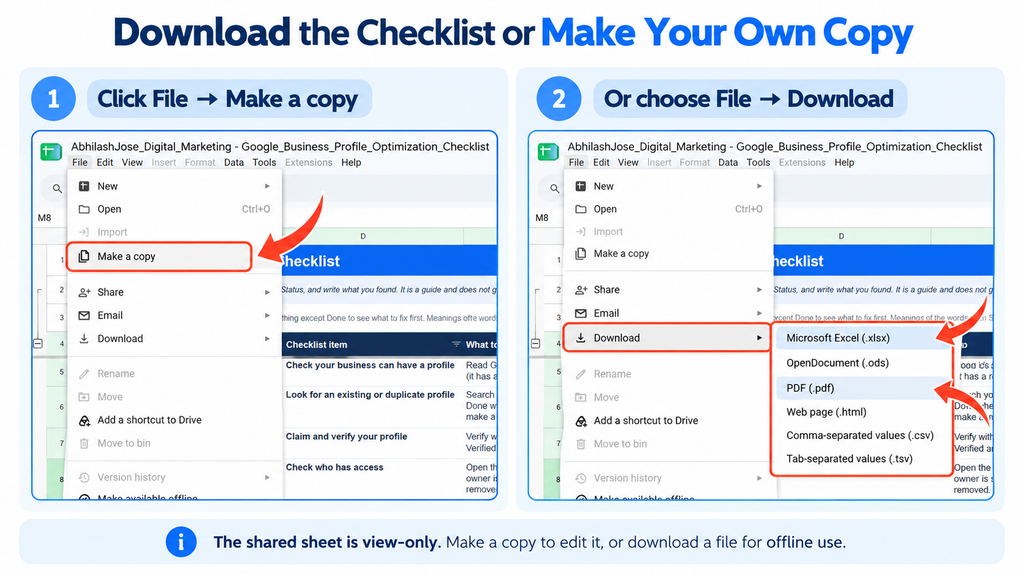
Make your own copy or download the checklist
The original spreadsheet is view-only. You have two options.
Option 1: Make an editable copy in Google Sheets
- Open the Google Business Profile Optimization Checklist.
- Select File → Make a copy.
- Save the copy to your Google Drive.
- Edit task statuses, record notes, assign priorities, and track your progress.
Option 2: Download the checklist
- Open the Google Sheets checklist.
- Select File → Download.
- Choose an available format, such as Microsoft Excel (.xlsx) or PDF (.pdf), depending on how you plan to use it.
Making a copy lets you edit your own version, while downloading a file gives you an offline copy.
What does each spreadsheet tab contain?
The spreadsheet is organized into tabs so you can manage different parts of your optimization work separately. Open the Google Business Profile Optimization Checklist to explore each one.
- Start Here: Read the workbook instructions, progress overview, and guidance on how to use the spreadsheet.
- Checklist: Work through the main action list, review priorities and statuses, and record instructions and notes for follow-up tasks.
- Help: Refer to plain-language explanations, examples, sample messages, and Google documentation when you need clarification.
- Monthly Tracker: Record and compare monthly Google Business Profile and website performance to identify changes over time.
- AI Check Log: Record the AI queries you test, the tools you use, the sources returned, and whether the answers accurately represent the business.
- More Locations: Organize information and checks for additional genuine business locations where applicable.
- Version & Legal: Review the workbook version, copyright information, terms, and privacy-related details.
You don’t need to complete every task in one sitting. Start with the high-priority issues, record what needs fixing, and return to the remaining tasks in a planned order.
Final Thoughts
Let me go back to my friend’s question for a moment.
“What is there to optimize?”
Quite a lot, as it turns out. None of it is especially complicated on its own. It just takes time, care, and the habit of coming back to it.
Google Business Profile optimization is an ongoing process, not a one-time setup task.
A profile can be verified and still contain outdated information, irrelevant categories, incomplete services, unhelpful photos, or unresolved policy issues. That is why verification isn’t the finish line.
Start with the essentials: eligibility, access, business details, and categories. Then improve what customers actually see, manage reviews responsibly, check your website and supporting local information, and measure the interactions that matter to your business.
Local SEO, AEO, and GEO can overlap, but they aren’t interchangeable, and none is a guaranteed ranking strategy. The practical goal is simpler than the terminology suggests: make your business information accurate, useful, and easy to understand for people and search systems.
Use the checklist one section at a time. Record what is complete, what needs attention, and what should be reviewed again.
You don’t have to fix everything today. But it is worth deciding what you will fix first.
Pick one section. Work through it. Then move to the next.
When I work with clients on SEO, this is the point I stress most: a Google Business Profile isn’t something you set up once and forget.
If you’re looking for help with your wider search visibility and website optimization, explore my SEO services.
Frequently Asked Questions
Is creating and verifying a Google Business Profile enough?
No. Creating and verifying a profile establishes its presence and completes the required verification process. Optimization also involves accurate information, appropriate categories, relevant visuals, reviews, services, policy compliance, website consistency, and ongoing measurement.
How often should a Google Business Profile be optimized?
There is no universal schedule. Review the profile whenever business information changes, such as opening hours, contact details, services, or location. A periodic audit can help you find outdated information and unresolved issues. More frequent reviews may be appropriate for businesses that change their offerings or opening hours regularly.
Do Google Business Profile posts improve rankings?
Posts can share useful updates and help customers understand current offerings. However, publishing posts is not a guaranteed ranking improvement. Keep posts accurate and useful rather than publishing frequently just to meet an arbitrary quota.
Do more Google reviews guarantee higher rankings?
No. Reviews can help potential customers evaluate a business, and Google’s local ranking guidance notes that reviews and ratings can contribute to prominence. However, more reviews don’t guarantee a higher position. Avoid buying reviews or manipulating feedback.
Should I add every possible business category?
No. Choose the most accurate primary category and relevant additional categories that genuinely describe the business. Irrelevant categories can misrepresent the business and create policy risks.
Does adding Local Business structured data guarantee local rankings?
No. Structured data can help search engines understand information on a website, but correct implementation doesn’t guarantee a particular ranking or rich result. It should support accurate, useful website content.
Does Google Business Profile optimization guarantee visibility in ChatGPT or Gemini?
No. Maintaining accurate business information and useful website content can support discoverability, but AI-generated answers depend on the systems, available sources, query, and other factors. There is no guaranteed method for getting a business mentioned in every AI answer.
Can I edit the Google Sheets checklist directly?
The shared original is view-only. Use File → Make a copy to create an editable version in your own Google Drive. You can also use File → Download to save an available format for offline use.
What should I fix first during a Google Business Profile audit?
Start with eligibility, access and verification issues, inaccurate business details, incorrect categories, duplicate profiles, and policy notices. Then review services, visuals, reviews, website consistency, local SEO, and measurement. Prioritize according to the actual problem rather than completing every item in the same order for every business.
Can outdated Google Business Profile information hurt my business?
Yes. If your address, phone number, or opening hours are wrong, customers may arrive at the wrong place or be unable to reach you. This can frustrate customers and affect how they perceive your business. Update your profile and other important sources when details change.
Should I reply to negative Google reviews?
In most cases, yes. Reply professionally, acknowledge the concern, and offer to continue the conversation privately. If you believe a review is fake or breaks Google’s policies, report it through Google’s process instead of arguing in public. Once a genuine issue has been resolved, you can update your reply to explain what you did.